강의
113강(Spring Security v3) ~ 117강(wrap-up)
Spring Security
Java 기반 보안 프레임워크
기능
인증Authentication) : 신원 확인
권한 부여(Authorization ) : 특정 자원이나 작업에 대한 접근 권한 확인
세션 확인 : 사용자 세션 보호, 동시 세션 제어, 세션 고정 보호 등의 기능 제공
CSRF 방지 : CSRF 공격 방지 기능 제공
인증
인가
Authorization
유저 권한 확인 및 허가
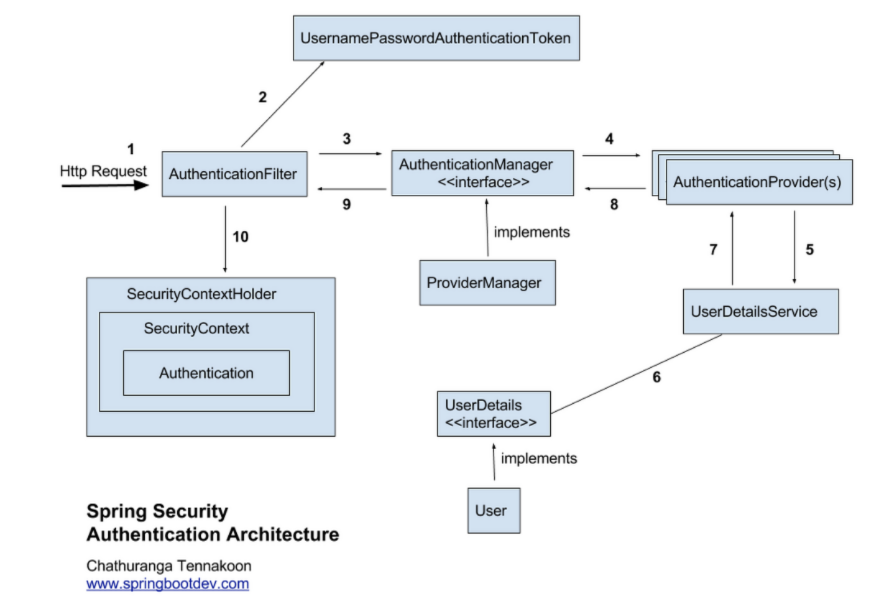
로그인 인증 처리 과정
AuthenticationFilter, UserDetails, UserDetailsService 구현하기
implementation 'org.springframework.boot:spring-boot-starter-security'
의존성만 추가한 경우
포스트맨의 Basic Auth에 {username : root, password : 아래 생성된 값 } 넣으면 동작됨
구현하기
AuthenticationFilter
JwtTokenProvider : JWT를 생성하고, 검증하며, JWT로부터 인증 정보를 추출하는 역할
JwtAuthenticationFilter : HTTP 요청을 가로채 JWT를 확인하고, 이를 통해 인증 정보를 추출하여 SecurityContext에 설정하는 역할
UserDetails : UserDetails 인터페이스를 상속 받아서 구현하기
getAuthorities : 권한 가져오기
getPassword : 패스워드 설정 , 유저 인증할 때 사용
getUsername : 유저 ID 정보, 유저 인증할 때 사용
UserDetailsService : UserDetailsService 인터페이스를 상속 받아서 구현하기
loadUserByUsername : username에 해당하는 사용자를 찾아서 userdetail 객체 생성해서 반환하기
보안지식 XSS
Cross Site Scripting
사용자가 웹 페이지에 악성 스크립트
의도적인 스크리팁 삽입을 통해서 쿠키 보내기 설정되고, 이를 통해서 서버 해킹이 발생
방지 방법
글 작성 시 스크립트 등록을 못하도록 설정
중요한 Cookie HTTPOnly 및 Secure 설정
CSRF
Cross Site Request Forgery
사용자의 세션이나 토큰을 이용해서 다른 명령 실행하기
방지 방법
HTTP의 Referer이나 HOST 이름 비교
CAPTCHA를 통해서 사람인지 확인
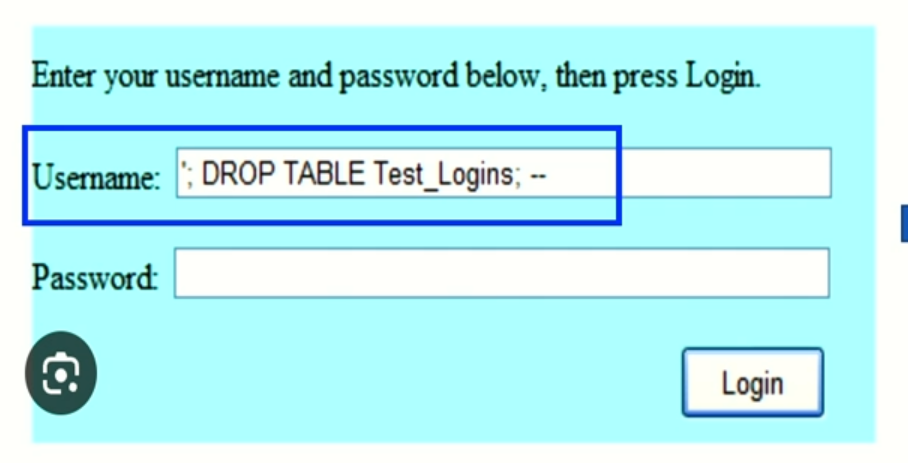
SQL Injection
서버 요청 시 악의적인 DB SQL문을 주입하는 해킹 방법
방지 방법
여러 IF문을 통한 검증 로직 추가
JPA 사용
SOP
Same Origin Policy
브라우저는 기본적으로 SOP 사용
외부에서 얻은 데이터는 항상 같은 Origin이어야함
Origin
출처
동일한 origin 판단 여부 : URI의 Protocol + Host + Port가 동일해야 함
ex) http://example.com과 http://example.com:8080은 다른 origin임
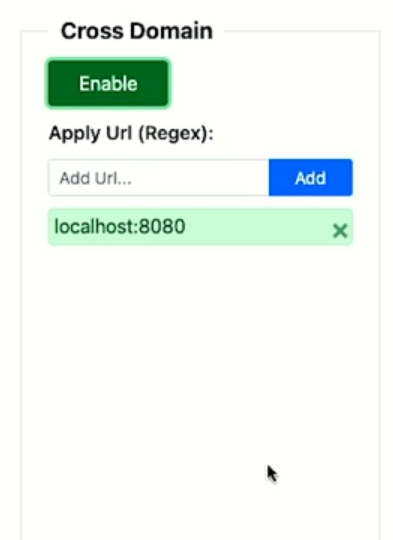
CORS
Cross-Origin Resource Sharing
front-end와 back-end 소통 시 발생할 수 있는 문제
해결방법
package com.github.supercodingspring.config.security;

import com.github.supercodingspring.web.filters.JwtAuthenticationFilter;
import lombok.RequiredArgsConstructor;
import org.springframework.context.annotation.Bean;
import org.springframework.context.annotation.Configuration;
import org.springframework.security.authentication.AuthenticationManager;
import org.springframework.security.config.annotation.authentication.configuration.AuthenticationConfiguration;
import org.springframework.security.config.annotation.web.builders.HttpSecurity;
import org.springframework.security.config.annotation.web.configuration.EnableWebSecurity;
import org.springframework.security.config.http.SessionCreationPolicy;
import org.springframework.security.web.SecurityFilterChain;
import org.springframework.security.web.authentication.UsernamePasswordAuthenticationFilter;
import org.springframework.web.cors.CorsConfiguration;
import org.springframework.web.cors.CorsConfigurationSource;
import org.springframework.web.cors.UrlBasedCorsConfigurationSource;

import java.util.Arrays;
import java.util.List;

@Configuration
@EnableWebSecurity
@RequiredArgsConstructor
public class SecurityConfiguration {

    private final JwtTokenProvider jwtTokenProvider;

    @Bean
    public SecurityFilterChain filterChain(HttpSecurity http) throws Exception {
        http.headers().frameOptions().sameOrigin()
                .and()
                .formLogin().disable()
                .csrf().disable()
                .cors().configurationSource(corsConfigurationSource()) // CORS 설정
                .and()
                .httpBasic().disable()
                .rememberMe().disable()
                .sessionManagement().sessionCreationPolicy(SessionCreationPolicy.STATELESS)
                .and()
                .authorizeRequests()
                    .antMatchers("/resources/static/**", "/v1/api/sign/*").permitAll()
                    .antMatchers("/v1/api/air-reservation/*").hasRole("USER")
                .and()
                .exceptionHandling()
                    .authenticationEntryPoint(new CustomAuthenticationEntryPoint())
                    .accessDeniedHandler(new CustomerAccessDeniedHandler())
                .and()
                .addFilterBefore(new JwtAuthenticationFilter(jwtTokenProvider), UsernamePasswordAuthenticationFilter.class);

        return http.build();
    }

    @Bean
    public AuthenticationManager authenticationManager(AuthenticationConfiguration authenticationConfiguration) throws Exception {
        return authenticationConfiguration.getAuthenticationManager();
    }

    @Bean
    public CorsConfigurationSource corsConfigurationSource(){
        CorsConfiguration configuration = new CorsConfiguration();
        configuration.setAllowedOrigins(List.of("http://localhost:63342"));
        configuration.setAllowCredentials(true); // token 주고 받을 때,
        configuration.addExposedHeader("X-AUTH_TOKEN"); // token
        configuration.addAllowedHeader("*");
        configuration.setAllowedMethods(Arrays.asList("GET", "PUT", "POST", "PATCH", "DELETE", "OPTIONS"));
        configuration.setMaxAge(3600L);

        UrlBasedCorsConfigurationSource source = new UrlBasedCorsConfigurationSource();
        source.registerCorsConfiguration("/**", configuration);
        return source;
    }
}
환경변수
서버 코드에서 공개되면 안되는 코드를 환경변수로 설정해서 사용함
설정 방법
로컬 컴퓨터 '환경변수'
코드에서는 환경변수로 실제 값 숨기기
@ConfigurationProperties : 여러 개의 환경변수를 한번에 가져올 때 사용
@Value : 한 개의 환경변수를 가져오기 위해서 사용
// application.yml
datasource:
	username: 123
	password: 1234

// build.gradle
dependencies {
    annotationProcessor "org.springframework.boot:spring-boot-configuration-processor"
}

// 가져오기.java
@Getter
@Setter
@ConfigurationProperties(prefix = "datasource")
public class DataSourcePropertries {
	private String username;
    private String password;
}

// 사용하기.java
@EnableConfigurationProperties(DataSourcePropertries.class)
@RequiredArgsConstructor
public class JdbcConfig {
	private final DataSourcePropertries dataSourcePropertries;

    public void test() {
    	System.out.println("username : " + dataSourcePropertries.getUsername());
    }
}
// application.yml
jwt:
secret-key-source : ${JWT_SECRET_KEY}
// 환경변수 설정 사용하기
public class JwtToeknProvider {
@Value("${jwt.secret-key-source}")
private String secreKey;
}
Spring 커리큘럼 확인하기 https://github.com/woowacourse/back-end-roadmap